

NOTE: Laura is NOT a lawyer. Just a mere web developer trained in accessibility. When in doubt, please contact your legal counsel.
What is this new ruling? I thought that school districts were already required to be compliant.
You’re correct! School districts, as public entities under Title II, have always been required to provide accessible services and effective communication for individuals with disabilities. This new ruling doesn’t create a brand-new obligation. Instead, it clarifies expectations by offering standardized guidance on what “accessible” web and mobile content looks like, including requirements for code, documents, and applications.
What is the new rule clarifying then?
In short, this update formalizes and clarifies the legal requirement for digital accessibility. The new ruling establishes the following key points:
Technical Standard
All web content and mobile apps must meet WCAG 2.1 Level AA standards.
Types of Content
This includes web content (text, images, sound, videos, and documents available on the web) as well as mobile apps.
Responsibility for Third-Party Content
Even if a vendor provides the platform or content, the school district is still responsible for making sure it’s accessible.
Compliance Deadlines
Establishes deadlines for entities to comply based on population.
Exceptions & Legacy Content
Some older or rarely used content may be exempt, but basic ADA obligations—like effective communication and equal access—still apply.
I’m feeling overwhelmed. Where should my district focus first?
Start by focusing on areas that most directly impact students, families, and staff, especially anything managed by third-party vendors. Make sure these services meet accessibility requirements or have clear remediation plans.
Key areas include:
- Website templates & CMS (e.g., Thrillshare, FinalSite)
- Parent and student apps (e.g., ParentSquare, Thrillshare)
- Key portals (e.g., Skyward, BoardDocs, Canvas)
Next, create an inventory of all digital assets your district manages. This helps you see what needs attention and who is responsible.
Examples include:
- Website content (headings, colors, alt text, etc.)
- PDFs/forms (enrollment, special programs, athletics, field trips)
- Digital content & newsletters
- Board agenda/meeting PDFs
- Videos and livestreams (with captions)
- Social media posts
OK, I made my list. It’s really long. What should I focus on next?
The next step is to conduct an accessibility audit of your digital content. Auditing helps you identify which areas need the most attention, but you’ll need a solid understanding of accessibility standards to do it effectively. Many districts work with a service provider for guidance.
For example, La Center School District partnered with ESD Communications to ensure their website met accessibility standards in response to the new ruling. We audited a sampling of pages and documents, provided a detailed report of issues, and helped them prioritize next steps. Based on the audit, La Center SD chose to move forward with full website remediation.
Did you know?
The ESD offers accessibility classes on a variety of topics including PDFs, presentations, and more. These courses are a great way to get started with creating accessible digital content and to build an understanding of accessibility requirements.
That’s great! So you know how to remediate websites and documents then?
Yes! I completed a comprehensive Web Accessibility Training Course in 2024 through Deque University. It’s a course designed for web developers, so it’s probably more in-depth than what most district staff would need, but it gave me the knowledge to effectively audit and remediate websites and documents.
I’d suggest taking classes geared towards general accessibility as well as specific to the tools you use (ie: Microsoft, Google, PDF, etc). The ESD offers classes in these areas.
Once my website has been remediated, are we “done” with compliance?
No. Every time a new page, post, newsletter, or board document is added, whether online or emailed, accessibility needs to be checked.
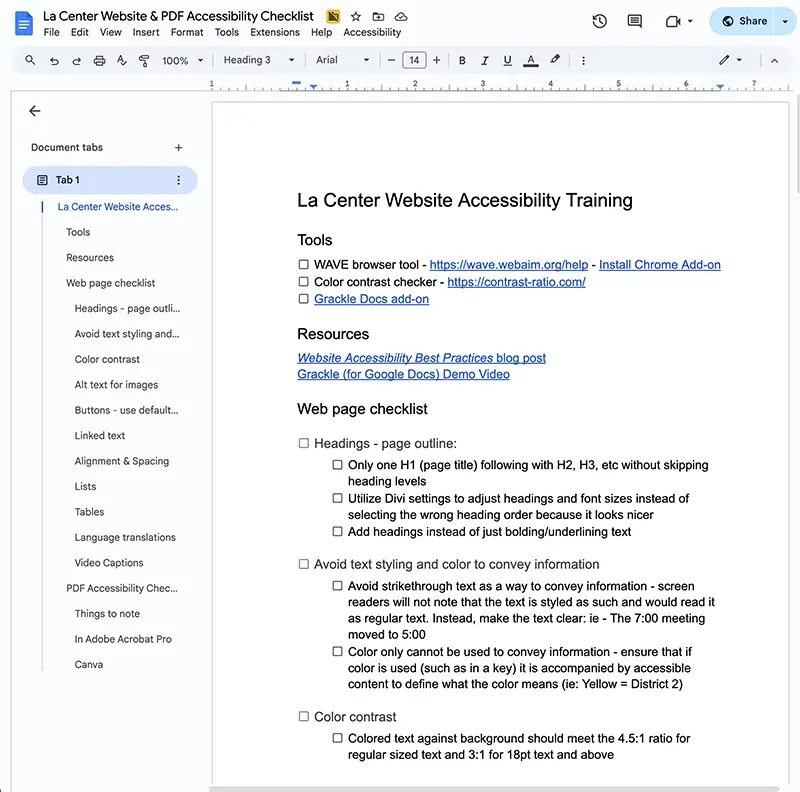
For example, La Center School District couldn’t contract with us for ongoing checks. Instead, their website editors needed the knowledge to maintain accessibility themselves.
To support them, we provided:
- Multiple website accessibility training sessions with customized checklists
- Virtual PDF accessibility trainings for key staff, enabling the district to remediate all PDF documents in-house
This approach ensures that accessibility becomes a sustainable, ongoing practice, not a one-time fix.
OK, I’ve got quite a bit of work to do for my district to be compliant. When do I have to get it all done?
Even though this new rule was effective June 24, 2024, compliance is not immediately required. Your district’s compliance deadline depends on the population of the area your district serves (not just enrolled students).
How to determine the population:
- City school district: use the city’s population
- County school district: use the county’s population
- Independent school district: use the population estimate from the most recent Small Area Income and Poverty Estimates (SAIPE)
| Population | Compliance date |
|---|---|
| 0 to 49,999 persons | April 26, 2028 |
| 50,000 or more persons | April 26, 2027 |
NOTE: You should work with your legal counsel to confirm how your district should calculate population.
Note: Compliance dates were extended by another year by the Department of Justice and have been updated on this article. View the extension information.
You mentioned something about legacy content and exemptions…what is exempt (crossing my fingers it covers a lot)?
Yes, thankfully there are things that are exempt. For a full list of exemptions, requirements, and examples, visit the ADA.gov FAQ page. Here are the main highlights that matter most for school districts:
Archived Web Content
Example: Pages or materials that must be retained in a dedicated archive, not actively updated, and kept only for reference purposes.
Preexisting conventional electronic documents
Example: Old flyers or materials for events that have already happened.
Preexisting social media posts
For most districts, making all past posts accessible isn’t feasible and often not very useful since they were time-sensitive updates. Preexisting social media posts made before the compliance date generally do not have to meet WCAG 2.1 Level AA standards, provided they are not updated after archiving or otherwise actively used.
Phew! Hopefully that eases some of the pressure. Just remember: once your compliance deadline hits, any new content you post must be fully accessible.
Well, you’ve given us a lot to consider (and do). Any final thoughts?
This can definitely feel overwhelming at first (just ask La Center!). But as you get familiar with the requirements and start making changes (one step at a time), accessibility will become a natural part of creating digital content. It takes a little time, but eventually it just becomes part of your process. Pinky swear!